Repository -> Databases
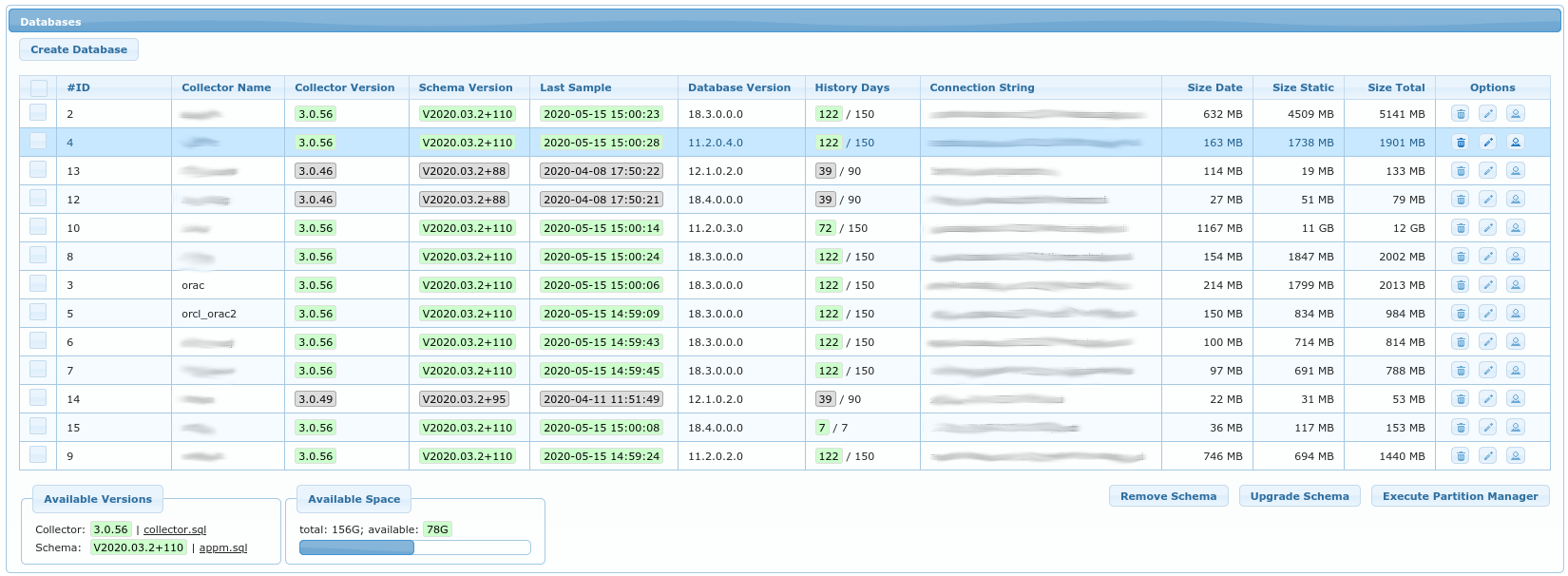
This is a list of all registered databases for which the APPM can receive samples (from APPM Collector, see Installation Guide on how to configure collector).
Each registered Oracle database can have following APPM related schemas installed:
APPM2schema (can be named differently) holds packages and views used by APPM application. This schema is (and should be)LOCKED.APPM_COLLECTORuser (can be named differently) can connect to database and query only specific view inAPPM2schema, through which it obtains performance samples.
Following buttons are available:
Create Database- opens a popup to enter details for new databaseRemove Schema- removesAPPM2schema from Oracle Database. Popup will ask forSYSDBApassword in order to do that.Upgrade Schema- upgradesAPPM2schema on selected Oracle Databases. Popup will ask forSYSDBApassword in order to do that.Execute Partition Manager- This is done automatically once per day. You can execute it on demand by using this button. It removes obsolete data and creates partitions until today + 3 days.
Note that following two links also exist if you are not keen on entering SYSDBA password into application:
collector.sql- creates/upgradesAPPM_COLLECTORschema on Oracle database if run assqlplus / as sysdba @collector.sqlappm.sql- creates/upgradesAPPM2schema on Oracle database if run assqlplus / as sysdba @appm.sql
For each database, following parameters are stored:
Database ID- autogenerated numerical id for each databaseCollector Name- unique name of database (APPM Collector refers to this name in itscollector.ini)Collector Enabled- flag to know which databases are not meant to receive any more samples (e.g. obsolete databases)Repository Schema- name of PostgreSQL schema which contains samples for this databaseRepository Tablespace- name of PostgreSQL tablespace which contains samples for this databaseConnection String- Oracle connection string in form ofhostname:port/service_nameAPPM Schema- Oracle schema name, usually namedAPPM2History Days- For how many days to store samples. Most data is partitioned by dates. Partition Manager deletes data older than this number of days.
Options columns have the following buttons:
Remove Database- which removes the database and all of its samples from repository (it does not connect to Oracle database)Edit Database- modify parameters of database. UsuallyHistory Daysis modified to match available space required. Not all options can be changed after database is registered (e.g.Repository Schemacannot be changed after created).Edit Credentials- (optional), used to store Oracle credentials used to connect to Oracle Database. This option should be used with care.
Databases
Databases table has some of its columns colored green, yellow or gray.
- green means that samples are up-to-date and version of
APPM2schema is up-to-date - yellow means that either samples are not collected in last 24h or that
APPM2schema is outdated. It can also mean that APPM Collector software is outdated and may not be fully compatible with this version of APPM Repository. - grey means that collector is disabled for this database so we don’t care whether it is outdated or not (nothing is being collected for this database)
Available Versions & Available Space
On the bottom of the screen is a chart of how much space is still available for samples. This usually refers
to amount of space available under /srv/appm mountpoint.
You can free some space by setting lower History Days and afterward Execute Partition Manager or you can
increase History Days if you see that you still have plenty of space available.