Performance -> Sessions
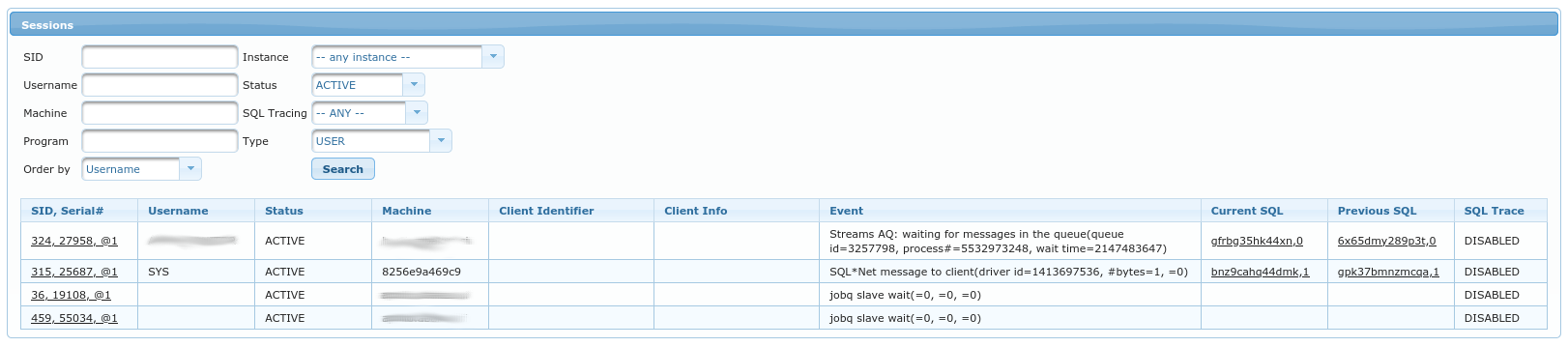
This view allows searching through v$session directly on the database that we’re connected to.
If you simply click Search without changing any criteria it will show all currently ACTIVE sessions.
You can of course search the sessions using provided form:
SID- by session ID (v$session.sid)Username- by username (v$session.username)Machine- by machine (v$session.machine)Program- by program (v$session.program)Instance- by instance id (v$session.inst_id)Status- whether to only search among currently [in]active sessions.SQL Tracing- whether to only search the sessions that have SQL Tracing enabled or disabled.Type- by type (v$session.type)
The table bellow displays results of your query. It contains columns from v$session - those columns are explained
in official Oracle documentation at:
https://docs.oracle.com/en/database/oracle/oracle-database/19/refrn/V-SESSION.html
Note that columns SID, Serial#, Current SQL and Previous SQL contain links to session or SQL details.